Text Generation
4 min
Text generation workflows use large language models (LLMs) to generate, rewrite, summarize, and analyze text from prompts. Use them for content creation, coding assistance, brainstorming, research, documentation, and Q&A.
Overview
Text generation workflows use LLMs to produce and transform text from your prompts. This example uses the Qwen3-5-9B model to generate text from a user prompt, with optional image input, so the model can understand both text and visual content.
MULTIMODAL: (note style) Because this model accepts images as well as text, you can ask questions about an image, extract information from it, or generate descriptions, not just work from text alone.
What you'll learn
- Generate text from prompts
- Use LLMs for content creation
- Generate code and technical content
- Analyze images alongside text prompts
- Adjust generation settings for different outputs
Example Workflow
- Enter your prompt: In the String (multiline) node, type the instruction or question you want the model to respond to. Examples:
- Write a product description for a smartwatch
- Summarize this article in three paragraphs
- Create a Java calculator application
- Explain machine learning in simple terms
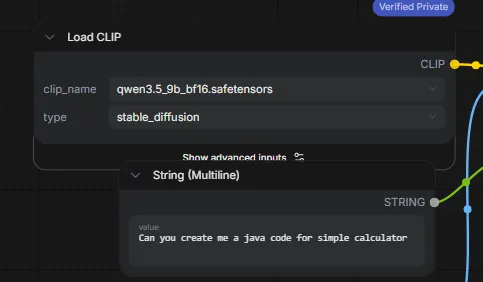
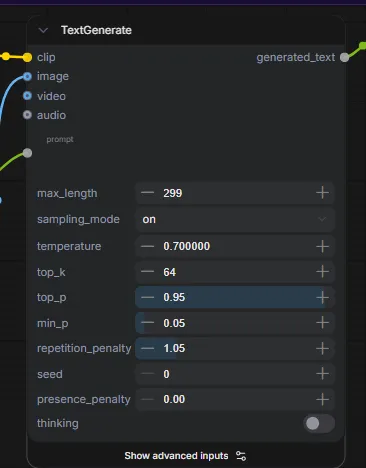
- Configure generation settings: The TextGenerate node controlshow the model responds (see the settings table below). For most use cases, the defaults work well without changes.
- Run the workflow: Click Run. The model processes your prompt (and image, if provided) and generates a response.
- Review the output: The response appears in the Preview as Text node. Review it, copy the text, and use it in your projects.