3D Production
3D production workflows transform images into usable 3D assets, letting you generate models, create dimensional product visuals, and build content for design, animation, and game development, all without advanced 3D modeling skills.
Overview
Whether you're working from a product image, concept art, an illustration, or a character reference, Floyo's 3D workflows simplify the process of turning a 2D image into a textured 3D model you can preview in-app and download for use elsewhere.
Example workflow
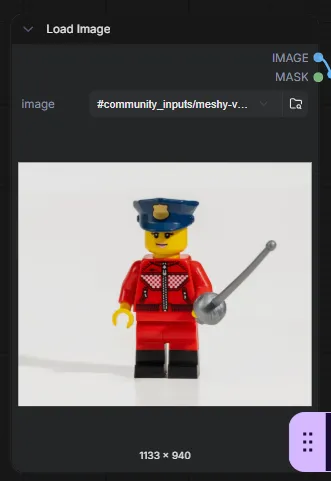
Step 1: Upload an Image
In the Load Image node, upload the image you want to convert into a 3D model.
For best results:
- Use a single subject
- Keep the object clearly visible
- Use a simple or clean background
- Avoid heavily cropped or low-resolution images
Step 2: Configure the Model Settings
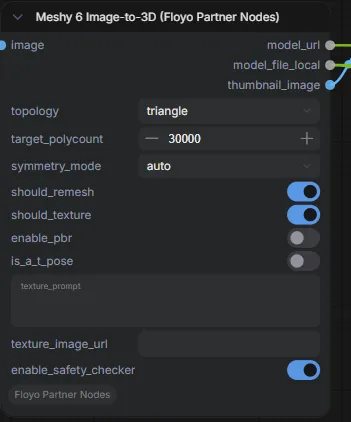
The Meshy 6 Image-to-3D node contains the settings used to generate the 3D model.
By default, the workflow is already configured and can be run without making any changes.
Optional settings include:
- Topology type
- Target polycount
- Symmetry mode
- Texture generation
- PBR material generation
For most users, the default settings provide a great starting point.
Step 3: Run the Workflow
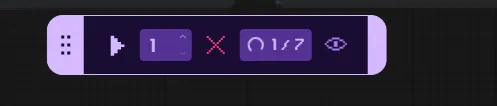
Click the Play button in the bottom toolbar to start generation.
The workflow will analyze the uploaded image and create a 3D model based on the object in the image.
Step 4: Preview the Generated Model
Once generation is complete, the generated model can be viewed in the Preview 3D & Animation panel.
Use the controls to rotate, inspect, and review the generated asset.
Step 5: Access the Output Files
The workflow generates a downloadable 3D model file along with any associated textures.
The output file location is displayed in the workflow and can also be accessed from the outputs folder.
Common use cases
📦 Product visualization
Convert product images into 3D assets for presentations, marketing campaigns, and e-commerce content.
🎨 Character & concept design
Turn illustrations, concept art, and character references into 3D starting points for further development.
🎮 Game development
Generate base meshes and assets to refine and import into engines like Unity and Unreal Engine.
⚡ Rapid prototyping
Create quick 3D representations of ideas without hours of manual modeling.
🖥️ Client presentations
Produce 3D previews and visual concepts for reviews, pitches, and stakeholder presentations.