Frequently Asked Questions
Answers to common questions about Floyo, workflows, billing, GPU usage, and account features.
Platform Basics
What is Floyo?
Floyo is a cloud platform that lets creators and teams find and run production-grade ComfyUI workflows without local hardware or complex setups. Everything runs in your browser.
Do I need local GPUs or any installation?
No. Floyo handles all workflow processing in the cloud. You access everything through your browser with no downloads, installs, or local GPU required.
Which browsers and operating systems are supported?
Browser Type | Support Level |
|---|---|
Chromium-based (Chrome, Edge, Brave) | Fully supported |
Firefox | Supported (performance may vary) |
Safari | Supported (performance may vary) |
Floyo works on macOS, Windows, and Linux.
Is Floyo open-source?
The core workflow engine builds on open-source ComfyUI. Floyo adds cloud infrastructure, team collaboration, security, and a discovery layer on top.
FloTime & Billing
What is FloTime?
FloTime is GPU compute time for running workflows. You only spend FloTime while a workflow is actively generating output. Editing, building, tweaking settings, and leaving the app open are all free.
Activity | Uses FloTime? |
|---|---|
Creating or editing workflows | No (Free) |
Tweaking node settings | No (Free) |
Browsing or loading workflows | No (Free) |
Running a workflow (generating) | Yes |
How much Flotime do I get on the free plan?
Check the pricing page for the free FloTime amount. Canvas building and editing is always free. FloTime is only used during active generation.
Does unused FloTime roll over?
Monthly allocation does not roll over. Flex FloTime (purchased separately at $7/hour) rolls over for up to 12 months.
What happens if I run out of FloTime mid-generation?
Your current workflow run finishes. Floyo never cuts you off mid-generation. Paid plan users can purchase Flex FloTime instantly in Settings, which is available immediately.
What is the Partner Nodes Wallet, and how is it different from FloTime?
This is the most common source of confusion. Floyo has two separate cost systems:
| FloTime | Partner Nodes Wallet |
|---|---|---|
What it covers | GPU compute time for running workflows | Calls to third-party closed-source AI models |
Included in subscription | Yes | Starter credits included, then pay-as-you-go |
Which workflows use it | Most workflows (open-source models) | Only workflows with Floyo Partner nodes |
How to identify | No dollar sign on nodes | Nodes show a "$X.XX" cost and a "Floyo-API" badge |
Most workflows on Floyo run entirely on FloTime using open-source models. Workflows that call external closed-source models (such as Wan 2.5 API, Kling, Flux Pro, Nano Banana, or Seedream) also consume Partner Nodes Wallet credits. The cost per run is displayed directly on the Partner Node before you generate.
How do I know if a workflow uses my Partner Nodes Wallet?
Open the workflow in the canvas and look for nodes with the "Floyo-API" badge. These nodes display their cost per run (for example, "$0.50/Run"). If you do not see any Partner Nodes, the workflow uses FloTime only.
I ran out off Partner Nodes credits faster than expected. What happened?
You likely used a workflow that contains Floyo Partner nodes, which charge separately from your subscription FloTime. Each Partner Node shows its cost on the node itself. The Partner Nodes Wallet starter credits can be consumed quickly with video generation or high-resolution API models.
You can add more Partner Nodes credits in Settings or switch to an open-source alternative workflow that uses only FloTime. For example, Wan 2.1/2.2 open-source versions and Flux.1 Schnell/Dev are available as FloTime-only alternatives.
Can I buy more FloTime or Partner Nodes credits?
Yes. Flex FloTime is available at $7/hour in Settings and rolls over for 12 months. Partner Nodes Wallet credits can be topped up in Settings at any time.
Workflows
How do I run a workflow?
Browse workflows on the Discover page, click a workflow to view details, then click "Open Workflow" to load it in the canvas. Edit any inputs (prompts, images), then click the Play button in the bottom toolbar to run it.
Does Floyo support video workflows or just images?
Both. Floyo runs multi-modal pipelines including image, video, 3D, and audio generation. You can chain different output types in a single workflow.
Can I import my local ComfyUI workflows?
Yes. You can drag and drop a workflow JSON file onto the canvas, use the Load Workflow button, or copy and paste the JSON directly. Node layout and connections transfer automatically. You may need to reselect models from Floyo's preloaded library.
My imported workflow has missing nodes. What do I do?
Floyo has 2500+ custom nodes, but some newer or niche nodes may not be installed yet. When you open a workflow with missing nodes, the team is automatically notified. Most nodes are installed within 24 to 72 hours. You can also email [email protected] with the node name and GitHub repository URL to expedite the request.
My workflow failed. How do I troubleshoot?
Start by checking for red error indicators on specific nodes in the canvas. Common causes include missing required inputs (images not uploaded, text fields empty), an incorrect model selected in a loader node, or missing custom nodes that have not been installed yet. Try running the workflow again, as temporary server issues can cause one-time failures. If the problem persists, share a screenshot of the error with support.
How do I save my workflow?
You can save workflows to your Floyo file storage, download them as JSON files to your computer, or publish them to your team or the community. Every generated image also embeds the full workflow in its metadata, so you or anyone else can drag that image back into Floyo to reopen the exact workflow.
How do I download my generated images and videos?
From File Browser:
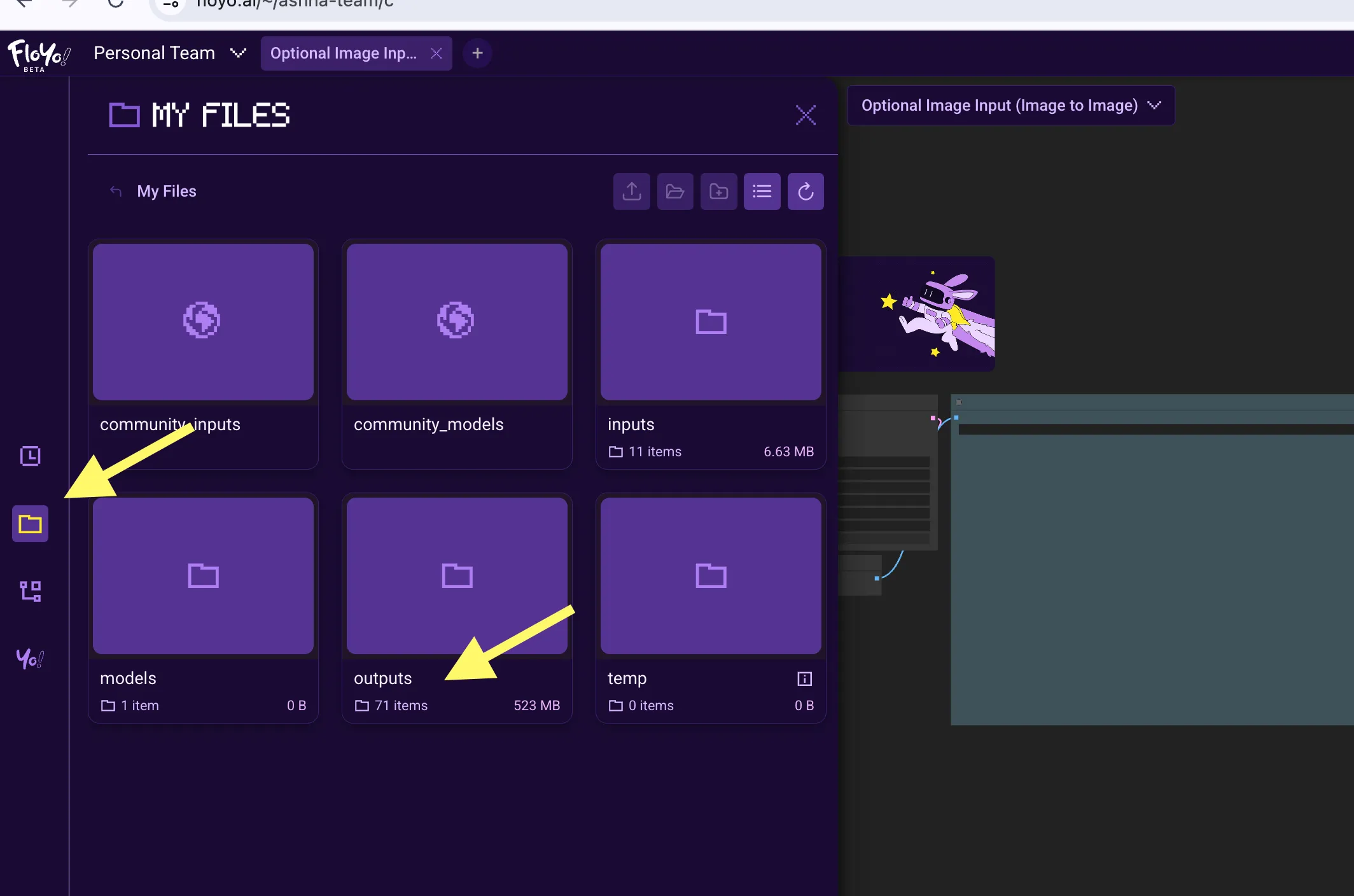
- Click the folder icon (📁) in the left sidebar
- Navigate to outputs
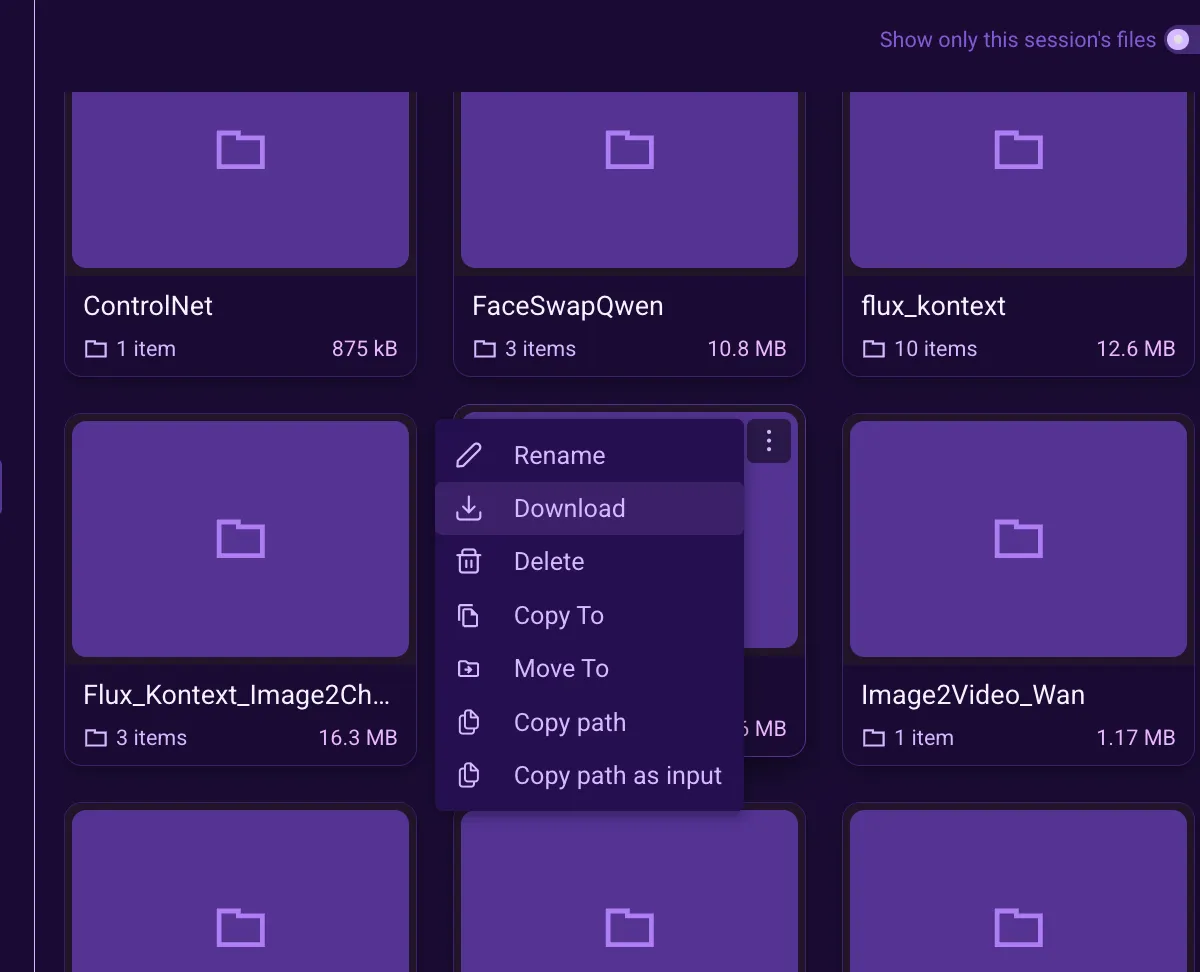
- Hover over your file and click the three-dot menu (⋮)
- Select Download
Where do my outputs get saved?
All generated files go to the outputs folder in File Browser.
My files disappeared from outputs
Free plan: Files auto-delete after 72 hours. Download important outputs immediately or upgrade for persistent storage.
Can't find my generated image?
Check the outputs folder in File Browser. If still missing, check Run History to confirm the workflow completed successfully.
Can I rerun a previous generation?
Open the Run History panel (clock icon in the left sidebar) to see all your past runs. You can drag a thumbnail from Run History onto the canvas to reuse a previous output, or click a run to reload that workflow.
Models & Assets
Can I upload my own models or LoRAs?
You can upload custom LoRA models directly on all plans, including the Free plan. Open the File Browser, navigate to models then loras, and upload your file. Other model types such as checkpoints, VAE, or diffusion models need to be requested through support. Email [email protected] with the model name and source link.
See Upload LoRA Models for step-by-step instructions.
My uploaded LoRA is not appearing in the node selector.
Press R on the canvas to refresh the model list, or close and reopen the workflow. New uploads may take a moment to appear in node dropdowns.
Do I own the outputs my team generates?
Yes. Your team retains full commercial rights to all generated outputs, subject only to the licenses of any third-party models used in the workflow.
Teams & Collaboration
How do teams work on Floyo?
Paid plans include team seats (Explorer: up to 5, Pathfinder and Trailblazer: up to 10). FloTime and storage are pooled across the team. Each member needs their own Floyo account. Admins can see usage per member in Settings.
Can my teammates see my workflows?
Workflows in the team workspace are visible to all members. Your personal workspace stays private unless you choose to share. You can also create Team Pages to organize workflows by project. Run history is shared so teammates can see and rerun your generations.
How do I invite team members?
Go to Settings, then Members, and invite by email. They create a free Floyo account and then join your team.
Why is the "Publish to Team" button not active?
The "Publish to Team" button is only active after you have successfully run your workflow at least once. Here's what to do:
- Launch your workflow - Click the play button (▶) in the toolbar at the bottom
- Wait for completion - The workflow must finish without errors
- The button will activate - Once the run is successful, "Publish to Team" will light up in the top right corner
If your workflow does not run, check for missing nodes, invalid connections, or configuration errors.[3] Only workflows that have run successfully can be published.
Content & Moderation
What content is allowed on Floyo?
Open-source models running in your private workspace have no content restrictions from Floyo, as long as your use is legal. Closed-source API models are controlled by their third-party providers and may have their own safety filters. Any content published to community pages must be appropriate for a general audience. Explicit NSFW imagery in thumbnails, previews, or published workflows is not permitted on public-facing areas of Floyo.
Files & Storage
How long are my files stored?
Free plan users have 72-hour file persistence for outputs and temp files. Paid plan users have persistent storage that lasts until manually deleted or the storage limit is reached. Download important outputs promptly if you are on the Free plan.
Where do I find my generated outputs?
Open the File Browser (folder icon in the left sidebar) and navigate to the outputs folder. Outputs are organized by run.
What file types can I upload?
Supported formats include PNG, JPG, JPEG, WEBP, and GIF for images; MP4, MOV, and WEBM for video; SafeTensors for LoRA models; and JSON and TXT for workflow files and metadata.
Account Management
How do I cancel my subscription?
Go to Settings, then Plans and Billing, then Manage Billing Info. Select Change Subscription Plan. Cancellations take effect at the end of your current billing cycle. Your access remains active until then.
Can I downgrade my plan?
Yes. Go to Settings, then Plans and Billing, then Manage Billing Info. Downgrades take effect at the end of your current billing cycle.
How do I delete my account?
Contact [email protected] to request account deletion.
Hardware & Performance
What GPUs does Floyo use?
Floyo runs on NVIDIA H100 NVL GPUs with 94 GB of HBM3 memory and 3.9 TB/s memory bandwidth. This is over 2x the bandwidth of RTX PRO 6000 or RTX 5090 GPUs, which means faster workflow execution especially for video generation and large models.
Is there a time limit per workflow run?
No. Workflows run until completion with no time cap. This is unlike some competitors that limit runs to 30 or 60 minutes.
Training
Can I train or fine-tune models in Floyo?
Yes. Any LoRA training workflow that is verified to run on Floyo can be executed directly in the app. Various training APIs can also be called within Floyo workflows.