Audio Generation
Audio generation workflows let you create speech, music, and cloned voices from text. This guide walks through a text-to-speech (TTS) workflow in detail, then points you to workflows for music generation and voice cloning.
Overview
Text-to-speech (TTS) workflows convert written text into natural-sounding speech using AI voices, useful for narrations, voiceovers, character dialogue, presentations, and accessibility content. This guide demonstrates a TTS workflow in Floyo and points to related audio capabilities below.
Example Workflow
This workflow uses Fish Audio TTS to convert text into speech and automatically save the generated audio file.
Using This Workflow
Step 1: Enter Your Text
Locate the Prompt Text node and enter the text you want the model to speak.
The generated audio will be based on the content provided in this field.
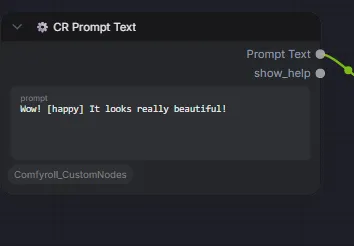
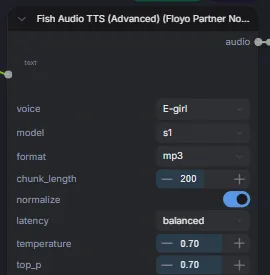
Step 2: Select a Voice
In the Fish Audio TTS node, choose the voice you would like to use.
Different voices may provide different tones, accents, and speaking styles depending on the workflow configuration.
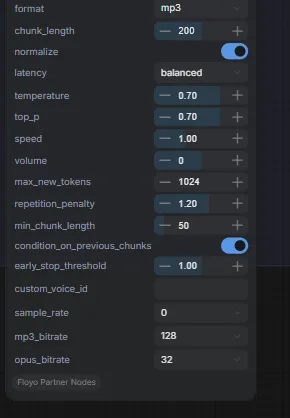
Step 3: Review the Settings
This workflow comes with default settings and can be used without making any modifications.
Advanced users can adjust settings such as:
- Speed
- Temperature
- Volume
- Chunk Length
- Latency
- Output Format
These settings can help fine-tune the generated speech if needed.
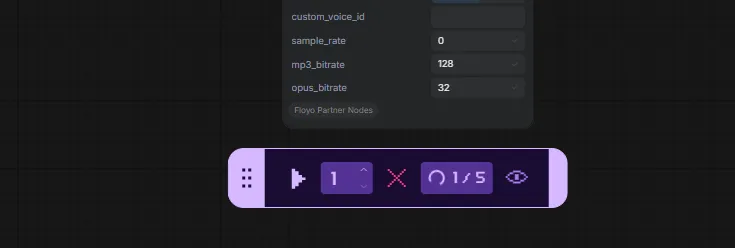
Step 4: Run the Workflow
Click the Play button in the bottom toolbar to generate the audio.
The workflow will process the text and create a speech file using the selected voice.
Step 5: Download the Audio
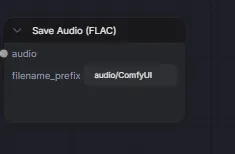
Once the workflow completes, navigate to the outputs folder in File Browser to preview and download the generated audio.
Common Use Cases
Text to Music
Generate original music from a text prompt by describing the mood, genre, instruments, tempo, or style you want.
This workflow is ideal for creating background music, concept tracks, social media content, game audio, and creative projects without requiring traditional music production tools.
Recommended Workflow
Text to Speech
Convert written text into natural-sounding speech using AI-generated voices.
Text-to-Speech workflows are commonly used for voiceovers, presentations, tutorials, audiobooks, podcasts, character dialogue, and accessibility-focused content.
Recommended Workflow
Voice Cloning
Generate speech using a reference voice sample while preserving the tone and characteristics of the original speaker.
Voice cloning can be used for personalized voiceovers, character voices, content localization, narration, and creative audio projects.
Recommended Workflow
Tips
- Use clear and descriptive prompts when generating music.
- Experiment with different voices to find the best match for your content.
- High-quality reference audio generally produces better voice-cloning results.
- Review generated audio before publishing or sharing.